Browser Extension (Utility)
Auto Typer
Point at any text, and it types it out for you — verbatim, character by character.
BetaFree Chrome
Types verbatim for you
Fully local, no AI/API
Free to use
What it is
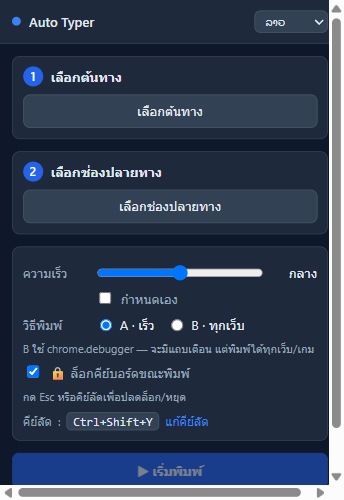
It's a Chrome extension that lets you point-and-pick any text on a page, then types it out for you — verbatim, character by character — into a field or a typing game. Fully local, no AI/API.
Real screenshots
How it works
1. Point at the text
Use the inspector-style picker to point at any text on the page
2. Pick the target field
Click the field or the game spot where it should type
3. Set the speed
Choose the typing speed (preset or custom ms-per-char) to look natural
4. Hit go — it types
Press the hotkey (Ctrl+Shift+Y), a 3-second countdown, then it types char-by-char
The problem it solves
Typing long or repetitive text is tedious. Some games/systems only accept real keystrokes — copy-paste won't work.
Why it's good
Saves time — no manually typing long text
Works with typing games — produces real keystrokes games accept
Fully local — no cost, no privacy concern
What it can do
- DevTools-style point-and-click text picker (pierces shadow DOM)
- Two typing strategies: in-page synthetic + real CDP keystrokes
- Adjustable speed (preset or custom ms-per-char); editable source
- Hotkey (Ctrl+Shift+Y) + 3-second countdown
- Per-site persistence; 4-language UI (lo/th/en/zh)
How it's used
1Practice / play typing games by letting it type for you
2Fill repetitive template text into forms
3Enter text into systems that block paste
Built with
Chrome Manifest V3Vanilla JSChrome DevTools ProtocolShadow DOM
Frequently asked questions
It's free and runs fully locally with no AI/API — no cost and no privacy concern.